Routing with PgRouting 4
If you are using a pgRouting prior to 4.0 see Routing with pgRouting 3.
Pre-process the OpenStreetMap Roads
The following query converts ST_MultiLineString data to individual rows of
LINESTRING records.
CREATE TABLE routing.osm_road_intermediate AS
WITH a AS (
-- Remove as many multi-linestrings as possible with ST_LineMerge()
SELECT osm_id, osm_type, maxspeed, oneway, layer,
        route_foot, route_cycle, route_motor, access,
        ST_LineMerge(geom) AS geom
    FROM osm.road_line
), extra_cleanup AS (
-- Pull out those that are still multi, use ST_Dump() to pull out parts
SELECT osm_id, osm_type, maxspeed, oneway, layer,
        route_foot, route_cycle, route_motor, access,
        (ST_Dump(geom)).geom AS geom
    FROM a
    WHERE ST_GeometryType(geom) = 'ST_MultiLineString'
), combined AS (
-- Combine two sources
SELECT osm_id, osm_type, maxspeed, oneway, layer,
        route_foot, route_cycle, route_motor, access,
        geom
    FROM a
    WHERE ST_GeometryType(geom) != 'ST_MultiLineString'
UNION
SELECT osm_id, osm_type, maxspeed, oneway, layer,
        route_foot, route_cycle, route_motor, access,
        geom
    FROM extra_cleanup
    -- Some data may be lost here if multi-linestring somehow
    -- persists through the extra_cleanup query
    WHERE ST_GeometryType(geom) != 'ST_MultiLineString'
)
-- Calculate a new surrogate ID for key
SELECT ROW_NUMBER() OVER (ORDER BY geom) AS id, *
    FROM combined
    ORDER BY geom
;
The above query creates the routing.osm_road_intermediate table. The next step
adds some database best practices to the table:
- Explain why a surrogate ID was added
- Primary key on the
idcolumn - Index on
osm_id
COMMENT ON COLUMN routing.osm_road_intermediate.id IS 'Surrogate ID, cannot rely on osm_id being unique after converting multi-linestrings to linestrings.';
ALTER TABLE routing.osm_road_intermediate
    ADD CONSTRAINT pk_routing_road_line PRIMARY KEY (id)
;
CREATE INDEX ix_routing_road_line_osm_id
    ON routing.osm_road_intermediate (osm_id)
;
Split Long Segments
Use the pgr_separateTouching() function to split line segments into smaller
segments and persist into a table.
This is necessary because pgRouting can only route through the ends
of line segments. It cannot switch from Line A to Line B from a point in the middle.
Warning: This is an expensive query that does not parallelize in Postgres. The Washington D.C. example (34k rows) takes roughly an hour (55 minutes) to run in Docker on my laptop.
DROP TABLE IF EXISTS routing.road_separate_touching;
CREATE TABLE routing.road_separate_touching AS
SELECT *
FROM pgr_separateTouching('SELECT id, geom FROM routing.osm_road_intermediate')
;
The
pgr_separateTouching()function supports a parameterdry_run => truethat returns the queries it runs instead of running the queries.
Combine Split Lines with Unmodified Lines
The routing.road_separate_touching table created using pgr_separateTouching()
has one row for each segment of the lines split by the function.
It does not contain every line from the source table.
The following query combines the two result sets.
A few column notes:
r.id, created as surrogate key inrouting.osm_road_intermediateis now aliased asparent_idsub_idis created bypgr_separateTouching()- A new
edge_idsurrogate ID is created asPRIMARY KEYon the table.
DROP TABLE IF EXISTS routing.osm_road_edge;
CREATE TABLE routing.osm_road_edge AS
WITH split_lines AS (
SELECT r.id AS parent_id, spl.sub_id, r.osm_id, r.osm_type, r.maxspeed, r.oneway, r.layer
        , route_foot, route_cycle, route_motor
        , r.access, spl.geom
    FROM routing.osm_road_intermediate r
    INNER JOIN routing.road_separate_touching spl
        ON r.id = spl.id
), unsplit_lines AS (
SELECT r.id AS parent_id, 1::INT AS sub_id, r.osm_id, r.osm_type, r.maxspeed, r.oneway, r.layer
        , route_foot, route_cycle, route_motor
        , r.access, r.geom
    FROM routing.osm_road_intermediate r
LEFT JOIN routing.road_separate_touching spl
    ON r.id = spl.id
WHERE spl.id IS NULL
)
SELECT *
    FROM split_lines
UNION
SELECT *
    FROM unsplit_lines
;

COMMENT ON TABLE routing.osm_road_edge IS 'OSM road data setup for edges for routing for motorized travel';
ALTER TABLE routing.osm_road_edge
    ADD edge_id BIGINT NOT NULL GENERATED ALWAYS AS IDENTITY PRIMARY KEY;
ALTER TABLE routing.osm_road_edge
    ADD source BIGINT;
ALTER TABLE routing.osm_road_edge
    ADD target BIGINT;
;
ALTER TABLE routing.osm_road_edge
    ADD CONSTRAINT uq_routing_road_edges_parent_id_sub_id
    UNIQUE (parent_id, sub_id)
;
At this point, the
routing.osm_road_intermediateis no longer necessary and can be dropped, unless troubleshooting is required within the data pipeline.
Create Vertices
The pgr_extractVertices() function is used to create the vertices from the
edges. Each vertex is the start or end point for one or more edges.
DROP TABLE IF EXISTS routing.osm_road_vertex;
CREATE TABLE routing.osm_road_vertex AS
SELECT  * FROM pgr_extractVertices(
  'SELECT edge_id AS id, geom FROM routing.osm_road_edge')
;
Shouldn't be any records with neither in/out edges set.
SELECT *
FROM routing.osm_road_vertex
WHERE in_edges IS NULL
    AND out_edges IS NULL
;
Update the edges table with information about vertices.
--  Update source column from out_edges
WITH outgoing AS (
    SELECT id AS source
        , unnest(out_edges) AS edge_id
  FROM routing.osm_road_vertex
)
UPDATE routing.osm_road_edge e
SET source = o.source
FROM outgoing o
WHERE e.edge_id = o.edge_id
    AND e.source IS NULL
;

-- Update target column from in_edges
WITH incoming AS (
    SELECT id AS target
        , unnest(in_edges) AS edge_id
  FROM routing.osm_road_vertex
)
UPDATE routing.osm_road_edge e
SET target = i.target
FROM incoming i
WHERE e.edge_id = i.edge_id
    AND e.target IS NULL
;
Should not be any records that are NULL in both source and target.
SELECT *
    FROM routing.osm_road_edge
    WHERE source IS NULL
        AND target IS NULL
;
Costs
The following query establishes a simple length based cost. In the case of defaults with PgOSM Flex, this results in costs in meters.
ALTER TABLE routing.osm_road_edge
    ADD cost_length DOUBLE PRECISION NOT NULL
    GENERATED ALWAYS AS (ST_Length(geom))
    STORED
;
COMMENT ON COLUMN routing.osm_road_edge.cost_length IS 'Length based cost. Units are determined by SRID of geom data.';
Determine route start and end
The following query identifies the vertex IDs for a start and end point
to use for later queries. The query uses an input set of points
created from specific longitude/latitude values.
Use the start_id and end_id values from this query
in subsequent queries through the :start_id and :end_id variables
via DBeaver.
This query simulates a GUI allowing user to click on start/end points on a map, resulting in longitude and latitude values.
WITH s_point AS (
SELECT v.id AS start_id, v.geom
    FROM routing.osm_road_vertex v
    INNER JOIN (SELECT
        ST_Transform(ST_SetSRID(ST_MakePoint(-77.0211, 38.92255), 4326), 3857)
            AS geom
        ) p ON v.geom <-> p.geom < 20
    ORDER BY v.geom <-> p.geom
    LIMIT 1
), e_point AS (
SELECT v.id AS end_id, v.geom
    FROM routing.osm_road_vertex v
    INNER JOIN (SELECT
        ST_Transform(ST_SetSRID(ST_MakePoint(-77.0183, 38.9227), 4326), 3857)
            AS geom
        ) p ON v.geom <-> p.geom < 20
    ORDER BY v.geom <-> p.geom
    LIMIT 1
)
SELECT s_point.start_id, e_point.end_id
        , s_point.geom AS geom_start
        , e_point.geom AS geom_end
    FROM s_point, e_point
;
┌──────────┬────────┐
│ start_id │ end_id │
╞══════════╪════════╡
│    14630 │  14686 │
└──────────┴────────┘
Warning: The vertex IDs returned by the above query will vary. The pgRouting functions that generate this data do not guarantee data will always be generated in precisely the same order, causing these IDs to be different.
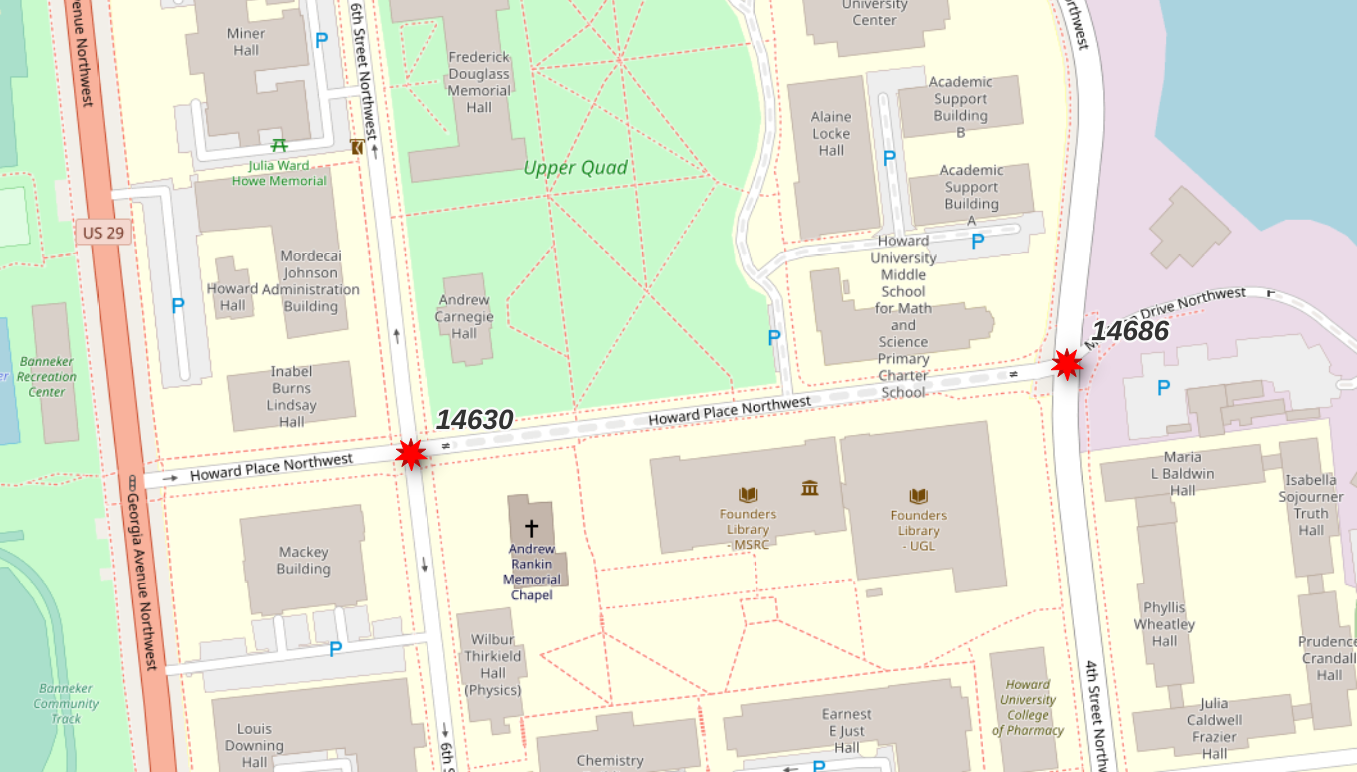
The vertex IDs returned were 14630 and 14686. These points
span a particular segment of road (osm_id = 6062791) that is tagged
as highway=residential and access=private.
This segment is used to illustrate how the calculated access
control columns, route_motor, route_cycle and route_foot,
can influence route selection.
SELECT *
    FROM routing.road_line
    WHERE osm_id = 6062791
;
See
flex-config/helpers.luafunctions (e.g.routable_motor()) for logic behind access control columns.
Route!
Using pgr_dijkstra() and no additional filters will
use all roads from OpenStreetMap without regard to mode of travel
or access rules.
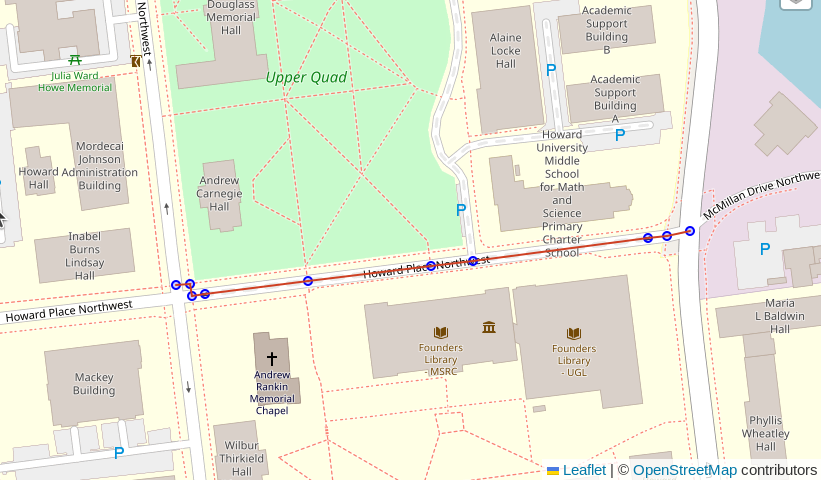
This query picks a route that traverses sidewalks and
a section of road with the
access=private tag from OpenStreetMap.
The key details to focus on in the following queries
is the string containing a SQL query passed into the pgr_dijkstra()
function. This first example is a simple query from the
routing.osm_road_edge table.
Note: These queries are intended to be ran using DBeaver. The
:start_idand:end_idvariables work within DBeaver, but not viapsqlor QGIS. Support in other GUIs is unknown at this time (PRs welcome!).
SELECT d.*, n.geom AS node_geom, e.geom AS edge_geom
    FROM pgr_dijkstra(
        'SELECT edge_id AS id, source, target, cost_length AS cost,
                geom
            FROM routing.osm_road_edge
            ',
            :start_id, :end_id, directed := False
        ) d
    INNER JOIN routing.osm_road_vertex n ON d.node = n.id
    LEFT JOIN routing.osm_road_edge e ON d.edge = e.edge_id
;
Route motorized
The following query modifies the query passed in to pgr_dijkstra()
to join the routing.osm_road_edge table to the
routing.road_line table. This allows using attributes available
in the upstream table for additional routing logic.
The join clause includes a filter on the route_motor column.
From the comment on the osm.road_line.route_motor column:
"Best guess if the segment is route-able for motorized traffic. If access is no or private, set to false. WARNING: This does not indicate that this method of travel is safe OR allowed!"
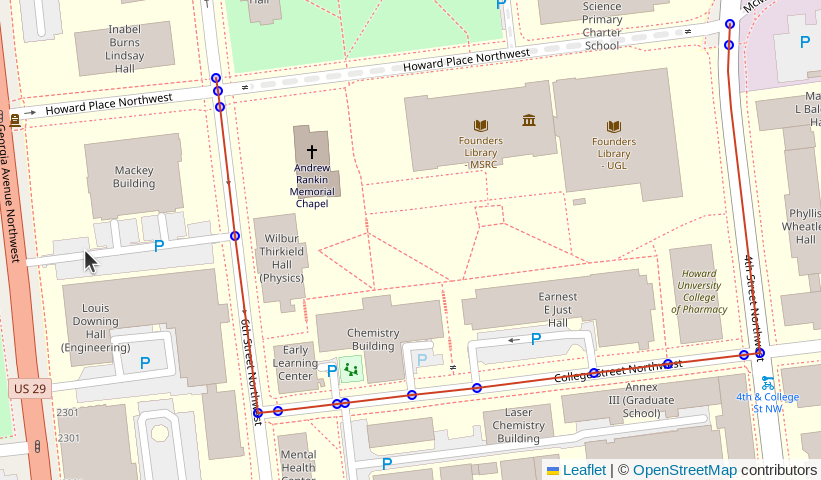
Based on this comment, we can expect that adding AND r.route_motor
into the filter will ensure the road type is suitable for motorized
traffic, and it excludes routes marked private.
SELECT d.*, n.geom AS node_geom, e.geom AS edge_geom
    FROM pgr_dijkstra(
        'SELECT e.edge_id AS id, e.source, e.target, e.cost_length AS cost,
                e.geom
            FROM routing.osm_road_edge e
            WHERE e.route_motor
            ',
            :start_id, :end_id, directed := False
        ) d
    INNER JOIN routing.osm_road_vertex n ON d.node = n.id
    LEFT JOIN routing.osm_road_edge e ON d.edge = e.edge_id
;
Route oneway
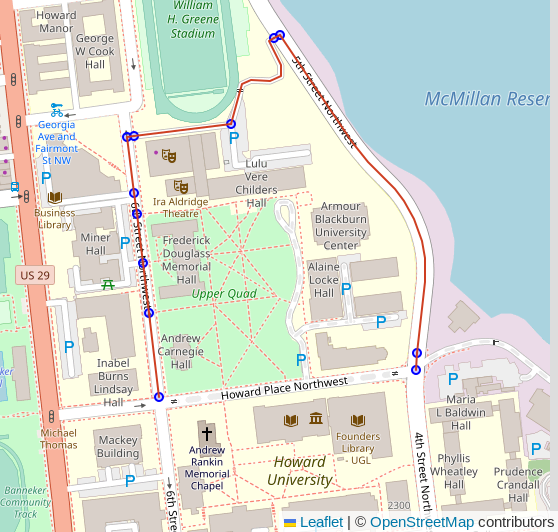
The route shown in the previous example now respects the access control and limits to routes suitable for motorized traffic. It, however, did not respect the one-way access control. The very first segment (top-left corner of screenshot) went the wrong way on a one-way street. This behavior is a result of the simple length-based cost model.
The oneway column in the road tables uses
osm2pgsql's direction data type
which resolves to int2 in Postgres. Valid values are:
0: Not one way1: One way, forward travel allowed-1: One way, reverse travel allowedNULL: It's complicated. See #172.
The routing.osm_road_edge table already has the oneway column from the
osm.road_line table used as the source.
Forward and reverse costs
Calculate forward and reverse costs using the oneway column. This still provides
a length-based cost. The change is to also enforce direction restrictions within
the cost model.
ALTER TABLE routing.osm_road_edge
    ADD cost_length_forward NUMERIC
    GENERATED ALWAYS AS (
        CASE WHEN oneway IN (0, 1) OR oneway IS NULL
                THEN ST_Length(geom)
            WHEN oneway = -1
                THEN -1 * ST_Length(geom)
            END
    )
    STORED
;
Reverse cost.
-- Reverse cost with oneway considerations
ALTER TABLE routing.osm_road_edge
    ADD cost_length_reverse NUMERIC
    GENERATED ALWAYS AS (
        CASE WHEN oneway IN (0, -1) OR oneway IS NULL
                THEN ST_Length(geom)
            WHEN oneway = 1
                THEN -1 * ST_Length(geom)
            END
    )
    STORED
;
This query uses the new reverse cost column, and changes
directed from False to True.
If you do not see the route shown in the screenshot below, try switching the
:start_id and :end_id values.
SELECT d.*, n.geom AS node_geom, e.geom AS edge_geom
    FROM pgr_dijkstra(
        'SELECT e.edge_id AS id, e.source, e.target
                , e.cost_length_forward AS cost
                , e.cost_length_reverse AS reverse_cost
                , e.geom
            FROM routing.osm_road_edge e
            WHERE e.route_motor
            ',
            :start_id, :end_id, directed := True
        ) d
    INNER JOIN routing.osm_road_vertex n ON d.node = n.id
    LEFT JOIN routing.osm_road_edge e ON d.edge = e.edge_id
;
Cleanup Intermediary tables
There are 2 tables used to build the routing network that are not needed
after the routing.osm_road_edge and routing.osm_road_vertex tables are
populated.
DROP TABLE IF EXISTS routing.osm_road_intermediate;
DROP TABLE IF EXISTS routing.road_separate_touching;